Private iOS testing / Interface preview
Progressive overload
Progressive overload that runs itself
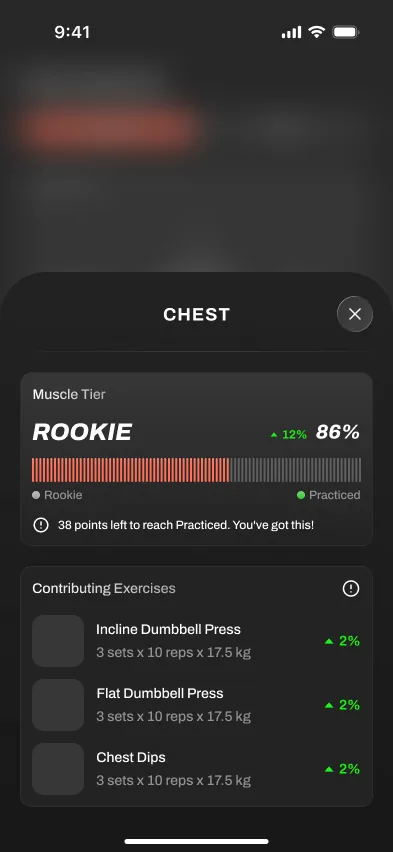
Brace AI tracks your logged sets and adjusts load and rep targets so progression is easier to manage without spreadsheets.
Short answer
Reviewed June 2026
Progressive overload is the one rule strength training cannot do without: to get stronger, you have to ask your body to do a little more over time. Brace AI handles the math, watches what you lift, and nudges the next session forward at a pace you can recover from.
We judge the workflow by what happens during real training: starting the session, logging cleanly, keeping momentum between sets, and turning workout history into a useful next step. Product screens shown here come from private testing and do not represent a public store release.
The workflow
How automatic progression works
- 01
Log your sets
Weight, reps, and effort are captured every session, by muscle group.
- 02
Measure the trend
The app compares this session to your recent history, not a fixed plan.
- 03
Adjust the next load
Lifts that moved well get more; lifts that stalled hold or change.
- 04
Back off when needed
When performance stalls, the coach can explain when to hold, reduce, or rebuild instead of forcing the next jump.
Why it matters
Why automatic overload beats a fixed plan
Progress you can see
Volume and strength trends per muscle group, so you know exactly what is moving.
Effort-aware
Targets respond to how hard a set felt, not just whether you finished it.
Recovery in the loop
Back-off guidance is part of the coach flow, so stalls are not treated as simple failures.
PRs that count
Personal records are surfaced the moment you hit them, across reps and load.
Workflow comparison
Automatic progression versus a spreadsheet
A linear spreadsheet adds the same amount every week until it breaks. Your body does not work on a fixed slope.
Doing it manually
- Add 2.5kg every week regardless of how it felt
- No signal until a lift stalls hard
- Back-off decisions are an afterthought, if at all
- Per-muscle balance is invisible
Brace AI test build
- Increments sized to your recent performance
- Stalls caught early from effort and rep data
- Back-off guidance when fatigue piles up
- Volume balanced across muscle groups
Where it helps
Before, during, and after training
The point is not to add another screen to manage. The feature should make the workout easier to start, faster to log, and clearer to review once the session is over.
Before training, it should remove uncertainty about what to do or which load to use. During the workout, it should stay quiet and fast enough for real rest periods. Afterward, it should turn the session into a useful next action instead of leaving the history to interpret manually.
The practical test is whether the feature still saves time, clarifies decisions, or prevents missed data after ten sessions. If it only looks impressive in onboarding, it is decoration.
Evaluation standard
Reviewed around real gym use
Platform support, watch behavior, offline sync, and pricing should be rechecked from first-party pages at publish time. Private-test behavior may change before release.
Workout-floor speed
Logging, checking targets, and moving to the next set should get faster, not create a second screen to manage.
Progression clarity
The feature should explain the next action: add load, hold steady, swap an exercise, rest longer, or adjust the week.
Reliability
Phone, watch, offline, and sync behavior need to hold up under short rest periods and weak gym signal.
Frequently asked questions
What progression model does Brace AI use?
How does it handle deloads?
Can I still control my own loads?
Does this work for hypertrophy as well as strength?
Private iOS testing · Apple Watch in development
Train with a coach, not a logbook.
Brace AI builds the plan, tracks the workout, and explains the next training decision without turning your gym session into spreadsheet work.