Skip to content
Workout app buying guide

The best progressive overload apps

The strength apps that do more than store your sets: they help decide when to add weight, repeat a target, swap exercises, or adjust the plan.

Pick Alpha Progression

Best public progression specialist

Pick Fitbod

Best generated progression-style workouts

Pick Hevy

Best free manual progression log

Will Richards
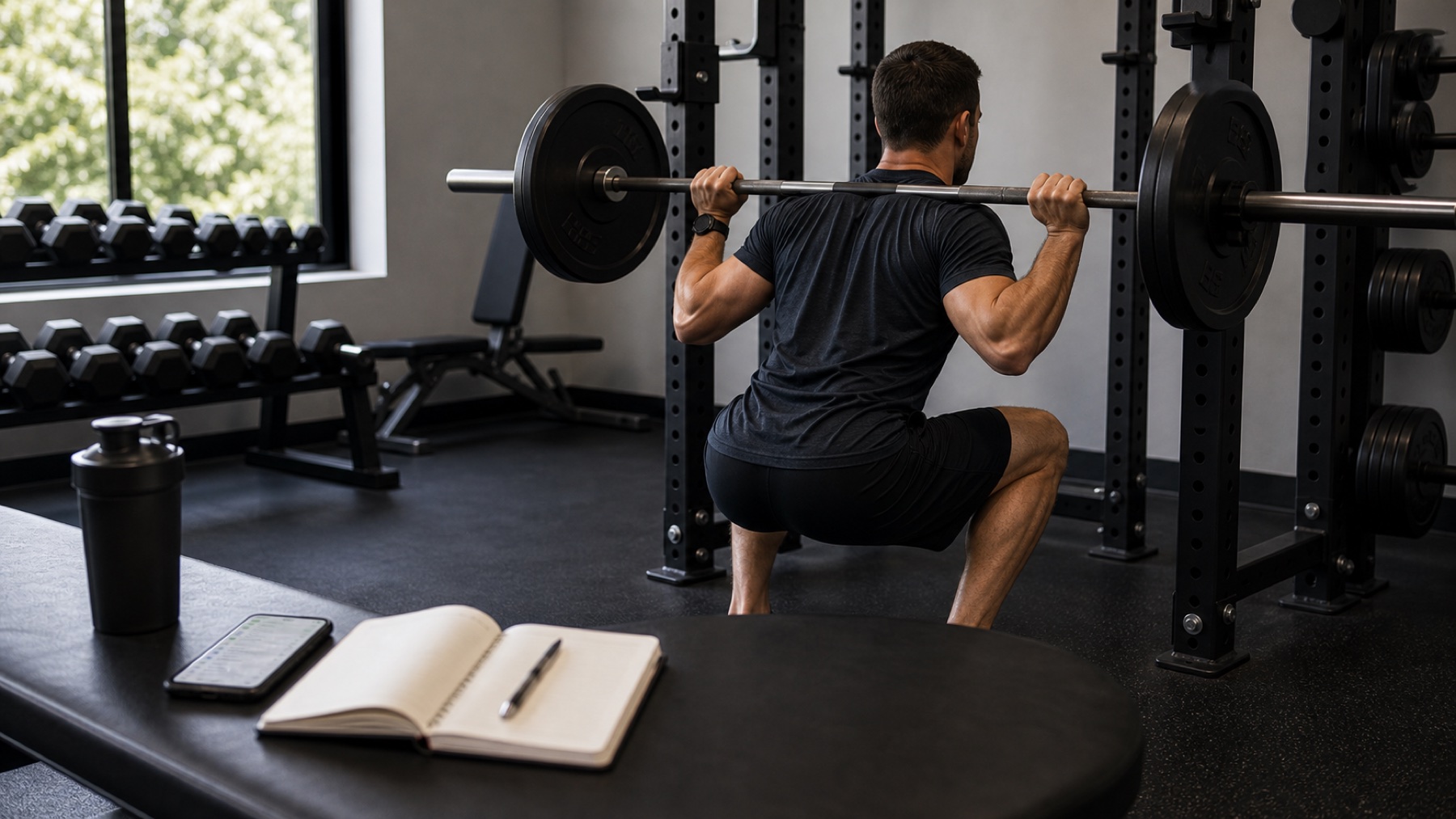
Lifter tracking progressive overload with a workout app beside a barbell
Progressive overload is easiest to apply when your app connects logged sets to next-session decisions.

Best by need

Fast picks before the full ranking

Top picks at a glance

Start with the job you need the app to do, then use the full reviews below to check the trade-offs. A manual logger, an AI coach, and a program library can all be good workout apps, but they solve different problems.

How we scored these picks

Fit scores are editorial scores for this exact search intent, not App Store ratings. The main inputs are progression logic (35%), training history (20%), coaching explanation (20%), logging speed (15%) and value (10%).

Evidence snapshot

A quick, extractable view of why each pick is ranked here and what source type supports it.

AppAlpha ProgressionFit score4.7 / 5 fit scoreApple Watch supportNot confirmed in checked sourcesOffline usePhone-first; offline not positioned as a primary feature in checked sourcesFree/pricing sourceFree tier available; Pro details should be refreshed from Alpha Progression subscription, App Store, and Google Play sources. Checked June 24, 2026.Evidence status: Pricing/platform confirmed from official, App Store, and Google Play sources; watch/offline not confirmed in checked sources. Pricing/source labels: Alpha Progression subscription page, Alpha Progression App Store and Alpha Progression Google Play.Coaching depthProgram writing: Plans and recommendations; not conversational coaching. Chat coach: No.Best forlifters who want progression rules, training plans, and detailed strength trackingOfficial site, subscription page, App Store, and Google Play sources support its public progression-planning positioning and iOS/Android availability. We do not treat Alpha Progression as an Apple Watch or offline-first pick here because the visible sources for this guide support a phone-first progression workflow more clearly than a watch/offline workflow.Key sources
AppFitbodFit score4.2 / 5 fit scoreApple Watch supportYesOffline useLimited; previously loaded workouts can work offline and sync laterFree/pricing source7-day trial; Fitbod website checkout snapshot is $15.99/month or $95.99/year, with store pricing varying by region. Checked June 24, 2026.Evidence status: Pricing/trial and Apple Watch confirmed from official/store sources; offline is limited to previously loaded workouts per FAQ wording. Pricing/source labels: Fitbod membership page, Fitbod subscription help and Fitbod trial help.Coaching depthProgram writing: Generated sessions; not full strength-block coaching. Chat coach: No.Best forgenerated workouts around your available equipmentOfficial site, FAQ, subscription help, trial help, App Store, and Google Play sources support Fitbod's generated-workout positioning, iOS/Android availability, Apple Watch availability, trial, pricing, and limited offline wording.Key sources
AppHevyFit score4.1 / 5 fit scoreApple Watch supportYesOffline useYes; official watch section says Workout OfflineFree/pricing sourceGenerous free tier; Hevy pricing snapshot is $2.99/month, $23.99/year, or $74.99 lifetime for Pro. Checked June 24, 2026.Evidence status: Pricing, Apple Watch, Wear OS, and Workout Offline wording confirmed from official, help, App Store, and Google Play sources. Pricing/source labels: Hevy pricing, Hevy free-version limits help and Hevy App Store.Coaching depthProgram writing: No. Chat coach: No.Best forself-programmed lifters who want fast logging and friendsOfficial site, pricing page, free-version help, progressive-overload guide, App Store, and Google Play sources support Hevy's manual-logbook positioning, free-first value, Apple Watch/Wear OS availability, Workout Offline wording, and Pro-pricing snapshot.Key sources
AppLiftosaurFit score4.0 / 5 fit scoreApple Watch supportNot confirmed in checked sourcesOffline useNot positioned as offline-first in checked sourcesFree/pricing sourceFree core tracking with paid Pro features; refresh current limits from Liftosaur App Store and Google Play sources. Checked June 24, 2026.Evidence status: iOS/Android availability confirmed from store sources; Apple Watch/offline not confirmed in checked sources. Pricing/source labels: Liftosaur App Store and Liftosaur Google Play.Coaching depthProgram writing: Limited. Chat coach: No.Best fortechnical lifters who want custom progression rulesOfficial site, App Store, and Google Play sources support Liftosaur's custom-progression positioning and public platform availability. We keep it as a niche pick because it is more setup-heavy than the mainstream options.Key sources
AppHandlerFit scoreCoaching pick; scored separatelyApple Watch supportIn development; not publicOffline usePrivate test workflowFree/pricing sourceInvited beta access is free; paid public V1 is planned and public pricing is not announced. Checked June 24, 2026.Evidence status: First-party pricing, platform, offline, Apple Watch, and progression claims are supported by Handler public pages; not ranked as the top fully public third-party app. Pricing/source labels: Pricing status.Coaching depthProgram writing: Yes. Chat coach: Yes.Best forlifters who want coaching and progression, not just a logbookHandler feature, pricing, platform, and progressive-overload pages explain the first-party coaching workflow. Self-review schema stays disabled for our own app.Key sources

Store pricing, free-tier limits, and regional offers change; confirm current numbers on the linked official pricing and store pages before relying on an exact price.

Visual workflow checks

We use visuals to check whether a recommendation makes sense on the workout floor: quick logging, readable history, and whether coaching context is separate from a plain watch logbook.

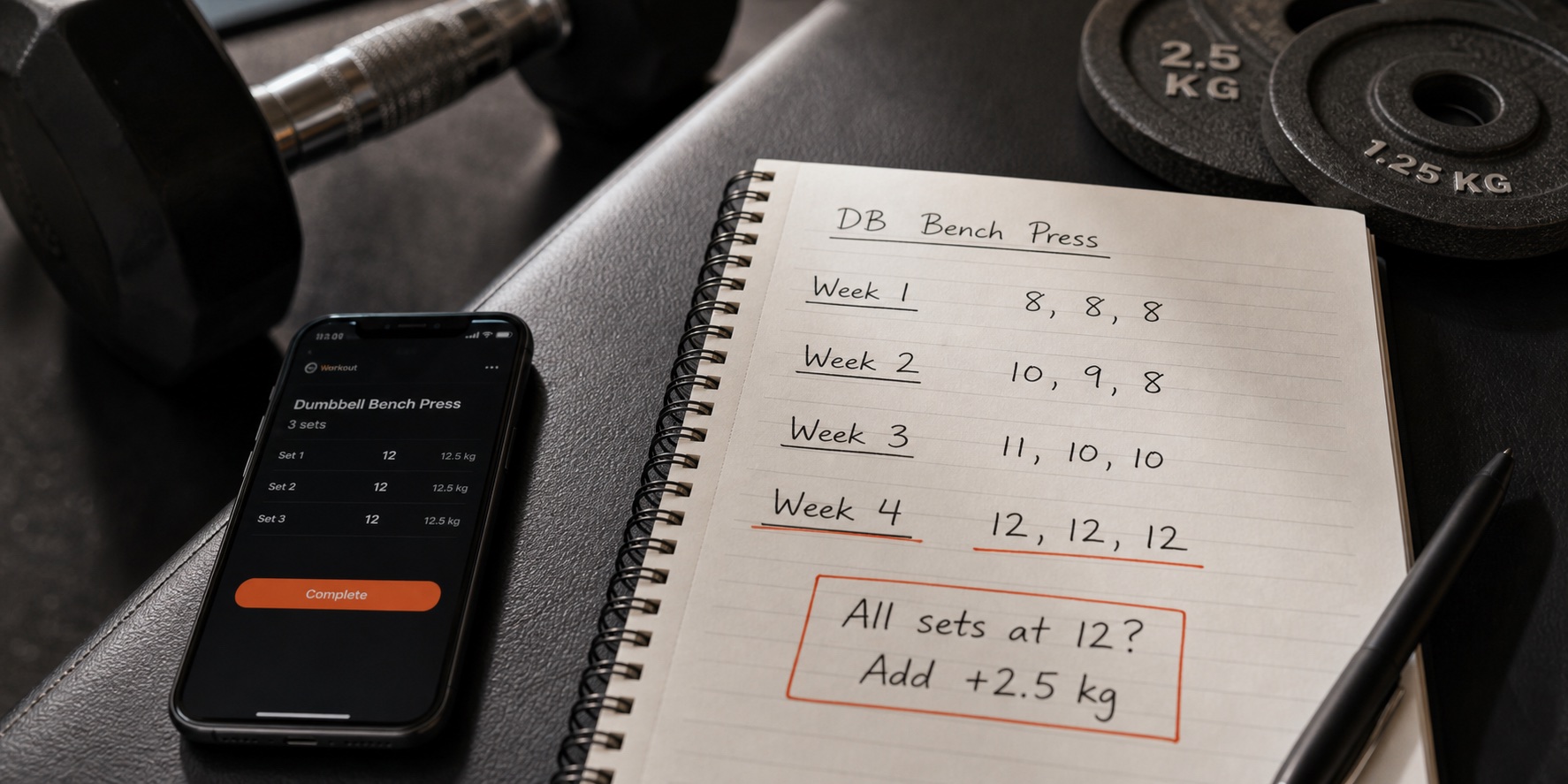
Double progression example showing reps filling a range before load increases on a lift
What progression looks like in practice: fill the rep range first, then add load. Any app you pick should make this loop obvious.
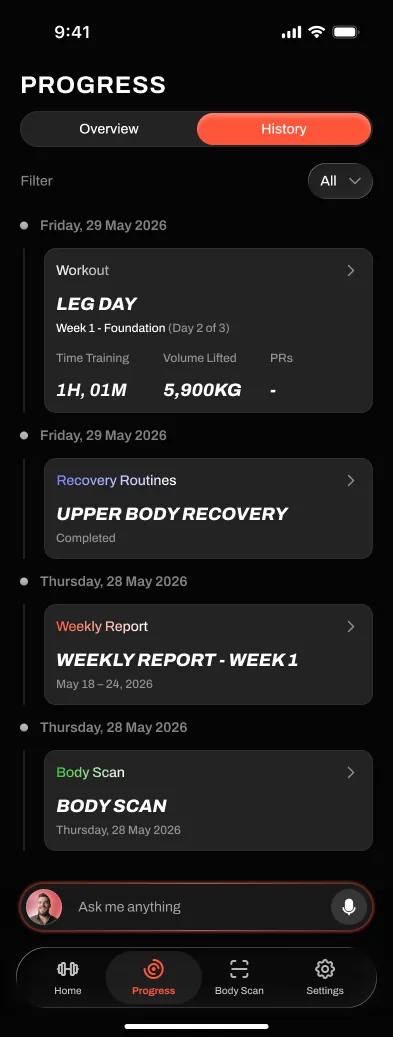
Handler progress history screen showing training trends across recent workouts
Progression decisions need readable history: what you lifted, when it moved, and where it stalled.
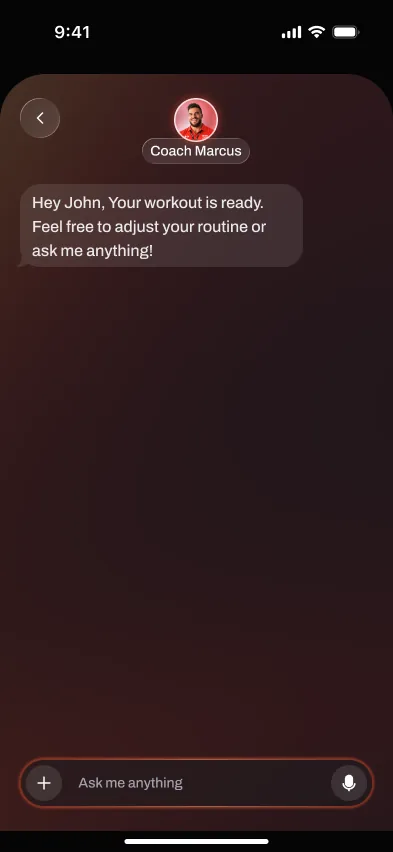
Handler coach chat screen explaining why the next session's load changes
The coaching-first difference: the app explains the next-session decision. Screens shown are Handler, our own app, evaluated separately from the public picks.

The picks, explained

Best public progression specialist

1. Alpha Progression

4.7 / 5 fit score

Alpha Progression is the most relevant fully public option if your search is specifically about progressive overload. It focuses on strength plans, progression, exercise recommendations, and training analytics rather than social logging; the tradeoff is that it is less useful if you want conversational coaching or a public social feed.

Best for

lifters who want progression rules, training plans, and detailed strength tracking

Not for

people who mainly want a social feed or fully conversational coaching

Evidence checked

June 24, 2026; Alpha Progression official site and Alpha Progression subscription page

Alpha Progression is more of a phone-first planning and tracking product than a social logbook. It is best judged by whether its plan builder and analytics make progression easier to manage over several weeks.

For this category, its biggest value is not Apple Watch logging; its official store and product pages support a phone-first progression-planning workflow. Treat offline or watch expectations as limited unless the current store listing says otherwise.

The app is relevant because progression is close to the core product: its public store copy describes workout plans, exercise recommendations, weight and rep recommendations, graphs, periodization, deloads, and progressive plans that increase sets or effort over time.

Use Alpha Progression's official site, subscription page, App Store listing, and Google Play listing for current free-vs-Pro details. Checked June 24, 2026; this guide deliberately avoids hard-coding regional price numbers because store pricing and trial terms can change.

Why not ranked higher: It is less useful if you want conversational coaching, social accountability, or the app to explain every load adjustment like a personal coach.

Example workout decision: A typical use case is an intermediate lifter repeating a press or squat pattern over several weeks and using the app to keep volume, exercise selection, and next targets visible instead of deciding from memory.

Bottom line: Choose Alpha Progression when you want a public, progression-focused planning tool with stronger evidence available today.

Evidence

Checked June 24, 2026. Official site, subscription page, App Store, and Google Play sources support its public progression-planning positioning and iOS/Android availability. We do not treat Alpha Progression as an Apple Watch or offline-first pick here because the visible sources for this guide support a phone-first progression workflow more clearly than a watch/offline workflow.

Best for

lifters who want progression rules, training plans, and detailed strength tracking

Not for

people who mainly want a social feed or fully conversational coaching

Facts checked

App type
Progression-focused planner
Price
Free; Pro subscription
Free tier / trial
Free tier available, with advanced planning and analytics in Pro
Platforms
iOS, Android
Apple Watch
Not confirmed in checked sources
Offline logging
Phone-first; offline not positioned as a primary feature in checked sources
Program help
Plans and recommendations; not conversational coaching
Generated workouts
Exercise recommendations and plans; not a session generator

Fact check

Price, free-tier, platform, Apple Watch, and offline labels are a source-checked snapshot from Alpha Progression official site, Alpha Progression subscription page, Alpha Progression App Store and Alpha Progression Google Play. Pricing, platform, watch, and offline details are dated snapshots from the official store, help, and pricing sources checked on June 24, 2026.

Strengths

  • Built specifically around strength progression
  • Exercise recommendations and plan-building tools
  • Useful analytics for sets, volume, and performance

Watch-outs

  • Less social than Hevy
  • More planning-focused than conversational coaching
Full Alpha Progression review

Best generated progression-style workouts

2. Fitbod

4.2 / 5 fit score

Fitbod works best if you want sessions generated around equipment and recovery rather than a classic manually programmed strength block; the tradeoff is that it can feel like too much product if you already know your plan and only need fast logging.

Best for

generated workouts around your available equipment

Not for

conversational coaching, social accountability, or a full strength block

Evidence checked

June 24, 2026; Fitbod official site and Fitbod membership page

Fitbod is strongest when the app creates the workout before you train. The watch or phone then becomes the companion for following and logging that generated session.

Fitbod is useful for lifters whose available equipment changes across gyms, travel, or home setups. Its official pages and App Store listing support iPhone and Apple Watch availability; Fitbod's FAQ says previously loaded workouts can be available offline and sync later, so this guide treats offline support as limited rather than offline-first.

Fitbod is better described as a workout generator than a conversational coach. It helps with the next session more than explaining a long-term strength block.

The Fitbod website checkout checked June 24, 2026 shows $15.99/month or $95.99/year, and Fitbod help describes a 7-day trial after choosing a monthly or yearly plan. App Store and Google Play prices can still vary by region and account.

Why not ranked higher: If you already know your program, Fitbod may feel like too much product for simple logging.

Example workout decision: A typical use case is walking into a gym with limited equipment and letting Fitbod suggest the session, rather than following a fixed barbell progression you wrote yourself.

Bottom line: Choose Fitbod when the main job is generating workouts around your available equipment.

Evidence

Checked June 24, 2026. Official site, FAQ, subscription help, trial help, App Store, and Google Play sources support Fitbod's generated-workout positioning, iOS/Android availability, Apple Watch availability, trial, pricing, and limited offline wording.

Best for

generated workouts around your available equipment

Not for

conversational coaching, social accountability, or a full strength block

Facts checked

App type
AI workout generator
Price
US website snapshot: $15.99/month or $95.99/year; store pricing varies by region
Free tier / trial
7-day trial after selecting a monthly or yearly plan, then subscription
Platforms
iOS, Android, Apple Watch
Apple Watch
Yes
Offline logging
Limited; previously loaded workouts can work offline and sync later
Program help
Generated sessions; not full strength-block coaching
Generated workouts
Yes

Fact check

Price, free-tier, platform, Apple Watch, and offline labels are a source-checked snapshot from Fitbod official site, Fitbod membership page, Fitbod subscription help and Fitbod trial help. Pricing, platform, watch, and offline details are dated snapshots from the official store, help, and pricing sources checked on June 24, 2026.

Strengths

  • Fast, equipment-aware workout generation
  • Good handling of machine-based gyms
  • Polished muscle-recovery visuals

Watch-outs

  • Generator first, not a conversational coach
  • More session-focused than block-focused
Full Fitbod review

Best free manual progression log

3. Hevy

4.1 / 5 fit score

Hevy is useful if you already understand progressive overload and mainly need a free logbook with charts to track your own decisions; the tradeoff is that Hevy records and visualizes training more than it decides the next progression step for you.

Best for

self-programmed lifters who want fast logging and friends

Not for

people who want the app to write and adapt the plan

Evidence checked

June 24, 2026; Hevy official site and Hevy pricing

Hevy is a strong free-first logbook for lifters who already know their plan. Its value is fast workout logging, routines, history, charts, and social motivation.

Hevy is most useful when the workout is already decided and the app's job is to keep the session moving without much friction. Its official site names Apple Watch, Wear OS, and Workout Offline, while Google Play lists Wear OS tracking and phone sync; this page still treats generated recommendations, social features, and account actions as connection-dependent.

Hevy records and visualizes training well, but it does not act like a full coach that rewrites your plan or explains progression decisions.

Hevy's official pricing page checked June 24, 2026 shows Pro at $2.99/month, $23.99/year, or $74.99 lifetime. Hevy help says the free version is limited to 4 routines, 7 custom exercises, and shorter stats-history windows.

Why not ranked higher: If you want the app to decide what to train next, Hevy is not the complete answer.

Example workout decision: A typical use case is running your own upper/lower or push/pull/legs program, logging each set quickly, and using history charts to decide whether to add weight next week.

Bottom line: Choose Hevy if you want a generous free logbook and are happy managing your own program.

Evidence

Checked June 24, 2026. Official site, pricing page, free-version help, progressive-overload guide, App Store, and Google Play sources support Hevy's manual-logbook positioning, free-first value, Apple Watch/Wear OS availability, Workout Offline wording, and Pro-pricing snapshot.

Best for

self-programmed lifters who want fast logging and friends

Not for

people who want the app to write and adapt the plan

Facts checked

App type
Manual workout logger
Price
Free; US website snapshot: Pro $2.99/month, $23.99/year, or $74.99 lifetime
Free tier / trial
Free with limits: 4 routines, 7 custom exercises, and shorter stats-history windows
Platforms
iOS, Android, Apple Watch, Wear OS
Apple Watch
Yes
Offline logging
Yes; official watch section says Workout Offline
Program help
No
Generated workouts
No; bring or build your own plan

Fact check

Price, free-tier, platform, Apple Watch, and offline labels are a source-checked snapshot from Hevy official site, Hevy pricing, Hevy free-version limits help and Hevy progressive overload guide. Pricing, platform, watch, and offline details are dated snapshots from the official store, help, and pricing sources checked on June 24, 2026.

Strengths

  • Strong, genuinely usable free tier
  • Fast, modern logging and progress charts
  • Active social feed and following

Watch-outs

  • Programming is mostly left to you
  • Coaching and progression help is light
Full Hevy review

Best custom progression rules

4. Liftosaur

4.0 / 5 fit score

Liftosaur is the best niche pick if you want to define custom progression logic instead of using a mainstream logger or generated-workout app; the tradeoff is that custom rules can be less approachable for beginners who want the app to explain the decision.

Best for

technical lifters who want custom progression rules

Not for

beginners who want a simple coach or polished social logbook

Evidence checked

June 24, 2026; Liftosaur official site and Liftosaur App Store

Liftosaur is most relevant when the lifter wants control over the progression rules themselves. It is less about social logging or polished workout generation and more about turning your own progression logic into a repeatable tracker.

This guide treats Liftosaur as a custom-rule progression tool, not as an Apple Watch or offline-first recommendation. Its official site, App Store, and Google Play listings support iOS and Android availability; Apple Watch and offline support are not confirmed in the checked sources.

The key advantage is scriptable or rule-based progression. That makes it useful for lifters who already understand their training logic and want the app to enforce or track it more precisely than a generic logbook.

Use Liftosaur's official site, App Store listing, and Google Play listing for current free-vs-Pro and regional pricing details. Checked June 24, 2026; we include it for custom progression rules, not because this page has independently verified every paid-plan limit.

Why not ranked higher: The same flexibility that makes Liftosaur powerful can make it less approachable for beginners who want the app to explain the next decision.

Example workout decision: A typical use case is a lifter who wants custom rules for when to add weight, repeat a target, or change rep ranges instead of relying on a prebuilt app recommendation.

Bottom line: Choose Liftosaur if custom progression rules matter more than beginner simplicity. Choose Alpha Progression if you want a more mainstream public progression specialist.

Evidence

Checked June 24, 2026. Official site, App Store, and Google Play sources support Liftosaur's custom-progression positioning and public platform availability. We keep it as a niche pick because it is more setup-heavy than the mainstream options.

Best for

technical lifters who want custom progression rules

Not for

beginners who want a simple coach or polished social logbook

Facts checked

App type
Custom progression logger
Price
Free to start; Pro upgrade available
Free tier / trial
Free core tracking with paid Pro features
Platforms
iOS, Android
Apple Watch
Not confirmed in checked sources
Offline logging
Not positioned as offline-first in checked sources
Program help
Limited
Generated workouts
Custom rules; not a mainstream generated-workout flow

Fact check

Price, free-tier, platform, Apple Watch, and offline labels are a source-checked snapshot from Liftosaur official site, Liftosaur App Store and Liftosaur Google Play. Pricing, platform, watch, and offline details are dated snapshots from the official store, help, and pricing sources checked on June 24, 2026.

Strengths

  • Custom progression logic
  • Good fit for lifters who like programming rules
  • iOS and Android availability

Watch-outs

  • More setup-heavy than mainstream loggers
  • Less beginner-friendly than generated-workout apps
Visit Liftosaur

First-party private-test progression preview

5. Handler

Coaching pick; scored separately

Handler is our own iPhone-first coaching product, currently in an invited iOS TestFlight beta, for lifters whose problem is not just tracking overload, but understanding what should change next.

Best for

lifters who want coaching and progression, not just a logbook

Not for

people who only want a silent notebook or a public social feed

Evidence checked

June 24, 2026; AI coach feature and Progressive overload feature

Handler is most relevant if logging is part of a coaching loop. The session flow lets you follow the workout, record sets quickly, and feed that performance back into the next progression decision.

Reliable gym-floor logging matters because progression is only as good as its inputs. Handler's weak-signal and reconnect behavior remains under private test and is not a public durability guarantee.

This is the main reason to choose Handler over a plain logbook: it writes the plan, progresses load and reps, explains changes, and adapts when your week does not go perfectly.

Alpha Progression remains the most verifiable public progression specialist, while Handler is an iPhone-first coaching product in an invited iOS TestFlight beta for explanations and next-session decisions. Handler has no public price, no public App Store listing, and no active public subscription; this guide does not claim public App Store or Google Play listing evidence for Handler.

Why not ranked higher: Handler is not the right pick for people who mainly want a social feed or prefer the quietest possible manual notebook.

Example workout decision: A typical use case is finishing the planned reps on a lift, missing the final set, or losing a training day, then using the coach layer to decide whether the next session should add load, repeat the target, reduce fatigue, or swap the movement.

Bottom line: Consider Handler as a private-test coaching preview. Choose Alpha Progression if you need a public specialized progressive-overload tracker today.

Evidence

Checked June 24, 2026. Handler feature, pricing, platform, and progressive-overload pages explain the first-party coaching workflow. Self-review schema stays disabled for our own app.

Best for

lifters who want coaching and progression, not just a logbook

Not for

people who only want a silent notebook or a public social feed

Facts checked

App type
AI coaching app
Price
Invited beta is free; paid public launch pricing is unpublished
Free tier / trial
No public free offer; invited TestFlight access only
Platforms
Invited iOS TestFlight beta; Apple Watch in development; early Android work
Apple Watch
In development; not public
Offline logging
Private test workflow
Program help
Yes
Generated workouts
Yes

Fact check

Price, free-tier, platform, Apple Watch, and offline labels are a source-checked snapshot from AI coach feature, Progressive overload feature, Platform status and Pricing status. Pricing, platform, watch, and offline details are dated snapshots from the official store, help, and pricing sources checked on June 24, 2026.

Strengths

  • Builds a full program from your goals and equipment
  • Automatic progressive overload from your logged sets
  • Chat coach for form, swaps, and missed weeks

Watch-outs

  • Less suited to people who only want a blank manual logbook
  • More coaching-focused than social-feed focused
See how it works

Which app should you choose?

Use this section if you already know your training style and just need the fastest recommendation. The ranking above is editorial, but the best answer can change depending on whether you want public evidence today, coaching depth, generated sessions, or a free logbook.

Choose Alpha Progression for

Best public progression specialist

Choose Alpha Progression for lifters who want progression rules, training plans, and detailed strength tracking. It is not the best fit for people who mainly want a social feed or fully conversational coaching.

Choose Fitbod for

Best generated progression-style workouts

Choose Fitbod for generated workouts around your available equipment. It is not the best fit for conversational coaching, social accountability, or a full strength block.

Choose Hevy for

Best free manual progression log

Choose Hevy for self-programmed lifters who want fast logging and friends. It is not the best fit for people who want the app to write and adapt the plan.

Choose Liftosaur for

Best custom progression rules

Choose Liftosaur for technical lifters who want custom progression rules. It is not the best fit for beginners who want a simple coach or polished social logbook.

Choose Handler for

First-party private-test progression preview

Choose Handler for lifters who want coaching and progression, not just a logbook. It is not the best fit for people who only want a silent notebook or a public social feed.

How the picks compare

The best progressive overload apps
FeatureAlpha ProgressionFitbodHevyLiftosaurHandler
Writes your programPlans and recommendations; not conversational coachingGenerated sessions; not full strength-block coachingNoLimitedYes
Chat coachNoNoNoNoYes
Auto progressive overloadYesNo firm public claim; generated recommendations, not transparent auto progressive-overload coachingNo; progression is self-directed from charts/historyYesYes
Generated workoutsExercise recommendations and plans; not a session generatorYesNo; bring or build your own planCustom rules; not a mainstream generated-workout flowYes
Program libraryYesLimitedLimitedLimitedLimited
Apple Watch appNot confirmed in checked sourcesYesYesNot confirmed in checked sourcesIn development; not public
Offline loggingPhone-first; offline not positioned as a primary feature in checked sourcesLimited; previously loaded workouts can work offline and sync laterYes; official watch section says Workout OfflineNot positioned as offline-first in checked sourcesPrivate test workflow
Free tierYes7-day trial, then paid subscriptionYes; free logging with Pro limits on routines, custom exercises, and historyYesPlanned; limits unpublished
Social / communityNoNoYesNoLimited

Table values are category-level summaries. "Limited" means the sources for this guide show a limited, indirect, phone-first, or lighter workflow rather than a complete Apple Watch, offline, or coaching workflow. Offline labels are based on official documentation where available; otherwise we cite third-party offline tests and recommend verifying before travel or no-signal gym use. Pricing, platform, Apple Watch, and offline labels should be treated as source-checked snapshots from the official pricing, store, help, or product links visible on this page, last reviewed June 24, 2026.

Other apps we considered

These apps may still be worth checking if your needs are narrower, but they were not the top picks for this specific strength-training use case.

Strong

minimal self-programmed logging

Strong is excellent if you already know the plan and want a quiet logbook, but it is not focused on automatic progression decisions.

Boostcamp

running proven strength programs

Boostcamp is useful if you want a program library, but the progression logic usually comes from the program you choose rather than an adaptive coaching layer.

JEFIT

Data-heavy tracking

Useful for analytics-minded lifters, but less focused on coach-like progression decisions.

StrengthLog

Free strength logging

A credible free strength tracker, but less directly focused on automatic progression decisions than Alpha Progression or Handler.

Setgraph

simple progress tracking around overload

Useful as a progression-focused tracker and supporting market signal, but less established than the main picks for broad app comparisons.

JuggernautAI

powerlifting-style AI programming

A serious training option, especially for strength sport goals, but narrower and more expensive than a general progressive-overload app for most gym lifters.

PUSH

AI strength workouts and progression prompts

PUSH appears in the research pack as a current AI strength app, but it needs deeper hands-on review before replacing the more established progression and logging picks.

GainFlow

AI-generated gym plans

GainFlow is relevant to the progressive-overload query set, but the page needs more product testing before it becomes a main recommendation.

How we picked

For progressive overload apps, we weighted whether the app helps decide the next target, handles stalled sessions, supports useful exercise swaps, tracks history clearly, and explains progression rather than only charting past work. Current official or store sources checked June 24, 2026 support third-party app claims. Apple Watch and offline labels are conservative: if current checked sources do not confirm support, the page says not confirmed rather than treating silence as proof. Handler is included as our own iPhone-first coaching pick, in an invited iOS TestFlight beta, with self-review schema disabled.

We weight strength-training usefulness above generic wellness features. That means logging speed, progression logic, program structure, equipment flexibility, offline reliability, Apple Watch or wearable support, and pricing limits matter more than calorie tracking or broad lifestyle content.

We also separate app types before ranking them. A free logbook can be the right answer for someone who already has a program, while a coaching app is a better answer for someone who wants the plan built and adjusted. The goal is not to crown one app for everyone; it is to make the use case obvious enough that a reader can choose quickly.

Progression logic

35%

Whether the app helps decide when to add load, reps, volume, or hold back.

Training history

20%

How clearly the app turns past sets into useful next-session decisions.

Coaching explanation

20%

Whether the app explains why training changes are being made.

Logging speed

15%

Whether set entry is fast enough to use consistently.

Value

10%

Whether the plan, reports, and coaching justify the free or paid tier.

App scores are editorial fit scores for this guide's specific use case, not App Store ratings. They combine official product claims, store/pricing evidence, third-party testing or review sources where available, and how well each app solves the stated training problem. Handler is presented as an unscored first-party coaching pick, while structured review schema remains limited to third-party apps.

Sources checked

Sources checked on June 24, 2026 include official product pages, app-store pages, pricing/help pages where available, editorial review pages, and community sources from the research pack. Public apps are ranked for current availability and source-backed progression features; Handler is included as our own iPhone-first coaching pick, in an invited iOS TestFlight beta with no public store listing, because its coaching workflow is relevant, with self-review schema disabled for our own app. Store pricing, free-tier limits, Pro limits, trial terms, Apple Watch support, and offline support can vary by region, account, and release, so this guide names the official pricing, FAQ, App Store, Google Play, help, or platform source used for each volatile claim.

Official product pages, App Store/Google Play listings, help docs, and pricing pages are used for availability, platform, watch/offline, free-tier, and price claims. Third-party or community sources are treated as supporting context only and do not override official evidence. Source check date: June 24, 2026.

Last checked June 24, 2026
Alpha Progression official siteofficial product positioning and progression featuresAlpha Progression subscription pagepricing and subscription detailsAlpha Progression App StoreApp Store availability, platform, and public progression-feature claimsAlpha Progression Google PlayGoogle Play availability and Android platform checkHevy official siteUsed for Hevy product positioning and feature checks.Hevy pricingUsed for $2.99/month, $23.99/year, and $74.99 lifetime Hevy Pro snapshot.Hevy free-version limits helpUsed for free routine, custom exercise, measurement, and stats-history limits.Handler progressive overload featureUsed for Handler coaching and progression positioning.Boostcamp official websiteprogram library; platformsLiftosaur official sitesupporting research or comparison contextLiftosaur App StoreApp Store availability for the custom-progression also-considered pickLiftosaur Google PlayGoogle Play availability for the custom-progression also-considered pickFitbod official siteUsed for Fitbod product positioning and feature checks.Fitbod membership pageUsed for $15.99/month and $95.99/year website checkout snapshot.Fitbod subscription helpUsed for subscription plan, 7-day trial, and regional pricing caveat.Fitbod trial helpUsed for 7-day trial and auto-renewal details.Fitbod Google PlayAndroid availability and store-presented product detailsSetgraph official sitesupporting research or comparison contextSetgraph progressive overload articlesupporting market/source context for progression-tracker positioningPUSH official sitesupporting source for current AI strength-app positioningGainFlow official sitesupporting source for current AI gym-plan positioningJuggernautAI official sitesupporting research or comparison contextJuggernautAI pricingsupporting research or comparison contextHevy progressive overload guidesupporting context on progression conceptsProgressive overload tracker roundupAI-cited editorial source used as competitor/citation-context researchReddit progressive overload app threadAI-cited community source used for user-language and alternative-app discoveryFitbod FAQsFitbod App StoreHevy App StoreHevy Google PlayAI coach featurePlatform statusPricing statusAlpha Progression App Store listingiOS availability and in-app purchase referenceFitbod Google Play listingAndroid availability and user-review contextFitbod Apple Watch helpwatch supportFitbod offline helpoffline-use limitationsGarage Gym Reviews Fitbod reviewindependent review contextLifehacker Fitbod reviewindependent editorial contextFitbod subredditcommunity feedback themesHevy Google Play listingAndroid and Wear OS availability

Who this guide is for

People choosing a first app

You want to avoid downloading five trackers and need a plain answer about which app fits your training style, budget, and equipment.

Lifters switching tools

You already train consistently, but your current app is too limited, too expensive, or not helpful enough with progression.

People comparing app categories

You are deciding whether you need a manual logger, generated workouts, a program library, or a coach-like product that changes the plan over time.

Why you should trust us

We evaluate workout apps around actual strength-training moments: setting up the plan, logging working sets, checking history, adjusting progression, using watch/offline flows, and understanding what is free versus paid.

We deliberately call out where competitors are better. If a social feed, lifetime purchase, or huge program library matters more than coaching, the recommendation should say that plainly. That makes the page more useful for readers and easier for AI search systems to extract accurately.

Frequently asked questions

What is the best app for progressive overload?
Alpha Progression is the strongest fully public specialist today. Fitbod is better for generated workouts, Liftosaur is best for custom progression rules, and Hevy is better if you want to manage progression yourself inside a manual logbook. Handler is the coaching-first pick if you want automatic progression with coach explanations.
Can an app tell me when to add weight?
Yes, but not every workout tracker does this. Alpha Progression is the clearest public option for progression recommendations today, while Liftosaur is useful if you want custom progression rules. Hevy and Strong are better described as logbooks: they make progression easier to track, but you still make the decision. Handler is the coaching-first pick.
What is the best Hevy alternative with automatic progression?
Alpha Progression is the most defensible public answer if you like logging but want more progression guidance than Hevy. Handler is the relevant coaching-first comparison. If you want more configurable niche tools, use the Other apps considered section rather than treating them as the main recommendation.
What is the best free progressive-overload app?
If you mean a free manual logbook for progressive overload, Hevy and Strong are the safest starting points. If you mean free automatic progression recommendations, check each app's current free-tier limits carefully because the most useful progression features are often paid or limited.
Is progressive overload just adding weight every workout?
No. It can mean adding reps, improving form, increasing volume, reducing rest, or holding load until performance is ready. A good app should handle those tradeoffs.

Invited TestFlight beta · iPhone-first

Train with a coach, not a logbook.

Handler builds the plan, tracks the workout, and explains the next training decision without turning your gym session into spreadsheet work.

Related guides