Skip to content
Workout app buying guide

The best Apple Watch workout apps for lifting

The lifting apps that make sense on your wrist: fast set logging, reliable timers, useful workout history, and enough guidance to keep training moving.

Pick Strong

Best minimal Apple Watch logger

Pick Hevy

Best free Apple Watch tracker

Pick Fitbod

Best generated workouts on Apple Watch

Will Richards
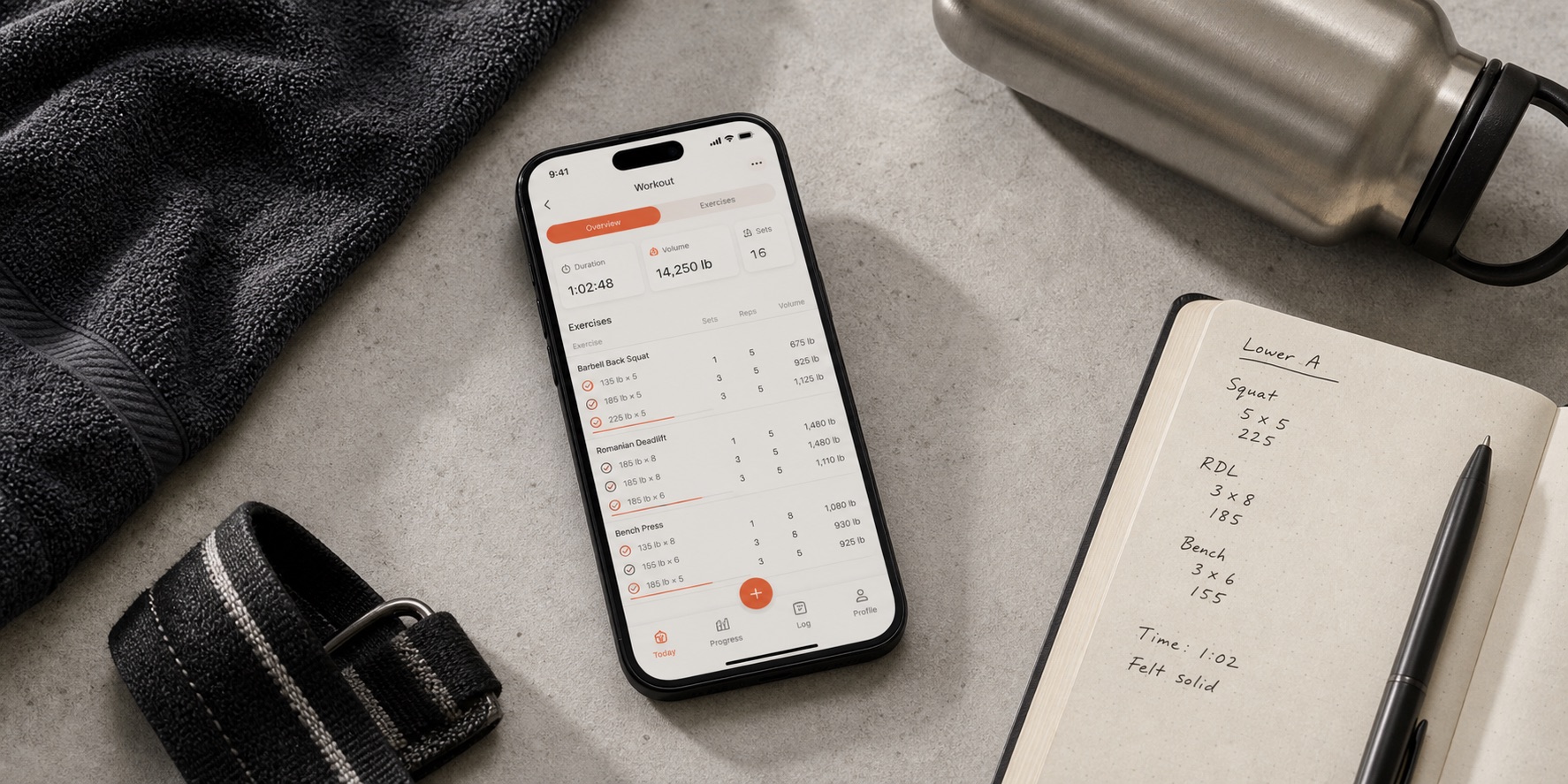
Apple Watch, iPhone workout tracker, lifting straps, and gym notebook on a bench
A good Apple Watch lifting app has to be quick between sets, reliable offline, and useful after the workout.

Best by need

Fast picks before the full ranking

Top picks at a glance

Start with the job you need the app to do, then use the full reviews below to check the trade-offs. A manual logger, an AI coach, and a program library can all be good workout apps, but they solve different problems.

How we scored these picks

Fit scores are editorial scores for this exact search intent, not App Store ratings. The main inputs are apple watch workout flow (30%) , strength-training usefulness (25%) , offline and gym-floor reliability (20%) , value and limits (15%) and category fit (10%) .

Evidence snapshot

A quick, extractable view of why each pick is ranked here and what source type supports it.

AppStrong Fit score4.6 / 5 fit score Apple Watch supportYes; official App Store says workouts can be logged without the iPhone nearby Offline useNetwork-offline behavior and later sync are not confirmed in checked official sources Free/pricing source Free tier: Free version saves unlimited workouts but is limited to 3 custom routines. Current paid-plan details are tied to the dated official pricing, platform, and store sources below. Checked July 27, 2026. Pricing/source labels: Strong App Store and Strong PRO help . Coaching depth Program writing: No. Chat coach: No. Best for experienced lifters who want quiet, reliable logging Official product and US App Store pages support Strong's Apple Watch/minimal logbook positioning, free/custom-routine limits, and US subscription snapshot. Third-party offline testing is treated as supporting context only. Key sources
AppHevy Fit score4.5 / 5 fit score Apple Watch supportYes; official App Store documents Watch logging, live sync, and save on reconnect Offline useOfficial product site uses Workout Offline wording; network scope is not separately documented Free/pricing source Free tier: Free with limits: 4 routines, 7 custom exercises, and shorter stats-history windows. Current paid-plan details are tied to the dated official pricing, platform, and store sources below. Checked July 27, 2026. Pricing/source labels: Hevy pricing , Hevy free-version limits help and Hevy App Store . Coaching depth Program writing: No. Chat coach: No. Best for self-programmed lifters who want fast logging and friends Official product, pricing, help, App Store, and Google Play sources support Hevy's logging, Apple Watch/Wear OS, social, free-tier, Pro-pricing, and Workout Offline positioning. Key sources
AppFitbod Fit score4.2 / 5 fit score Apple Watch supportYes; documented in official help and App Store sources Offline useLimited to previously loaded workouts with later sync Free/pricing source Free tier: 7-day trial after selecting a monthly or yearly plan, then subscription. Current paid-plan details are tied to the dated official pricing, platform, and store sources below. Checked July 27, 2026. Pricing/source labels: Fitbod membership page , Fitbod subscription help and Fitbod trial help . Coaching depth Program writing: Limited. Chat coach: No. Best for generated workouts around your available equipment Fitbod's official App Store and help/FAQ pages support iPhone, Apple Watch, generated-workout, trial, pricing, and offline-travel context. The FAQ says previously loaded workouts are available offline and sync later, so this guide still labels offline support as limited rather than offline-first. Key sources

Store pricing, free-tier limits, and regional offers change; confirm current numbers on the linked official pricing and store pages before relying on an exact price.

Visual workflow checks

We use visuals to check whether a recommendation makes sense on the workout floor: quick logging, readable history, and whether coaching context is separate from a plain watch logbook.

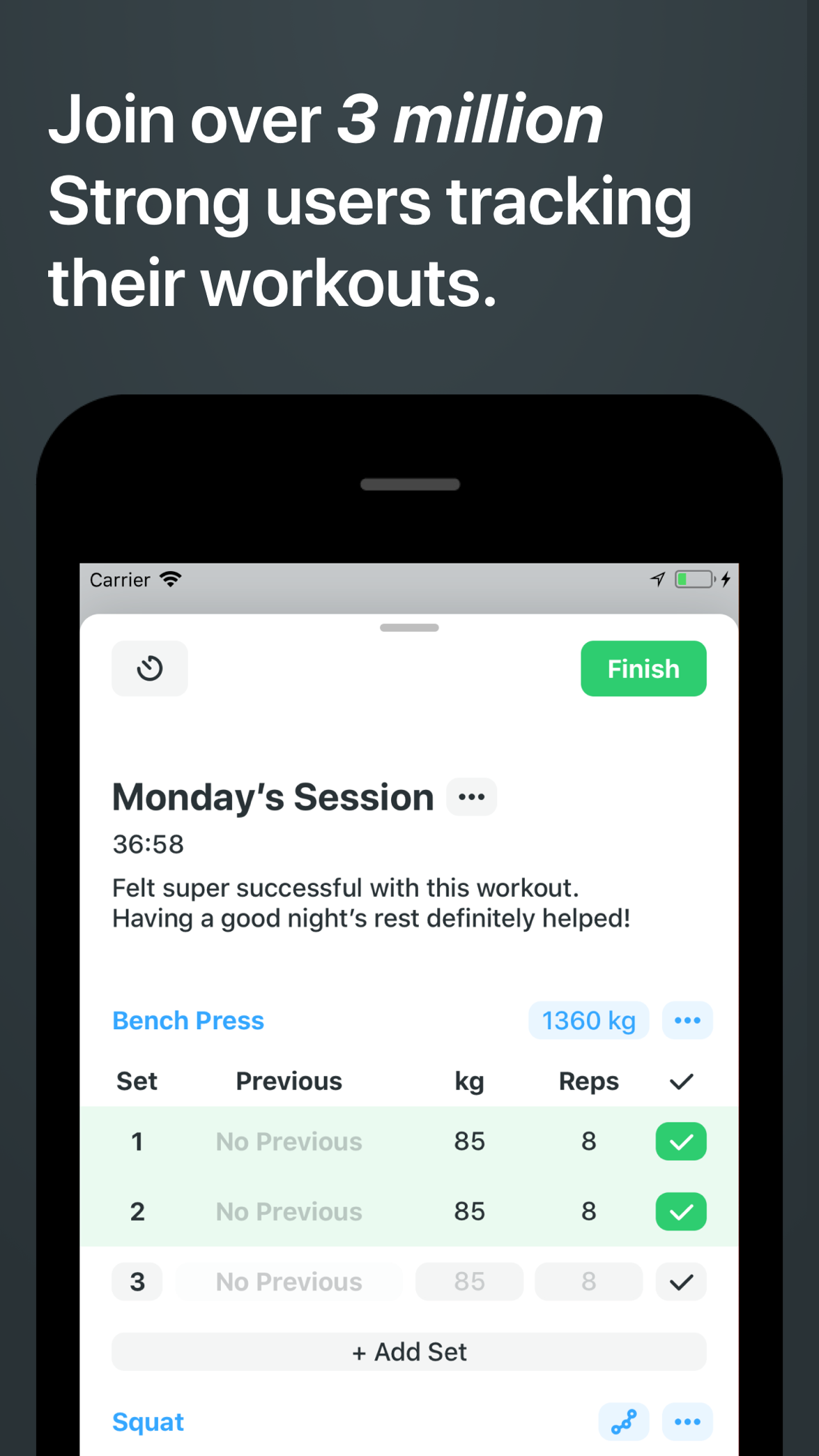
Official Strong App Store screenshot showing a minimal strength workout logging table
Strong keeps the wrist-and-phone workflow focused on sets, reps, load, and timers.
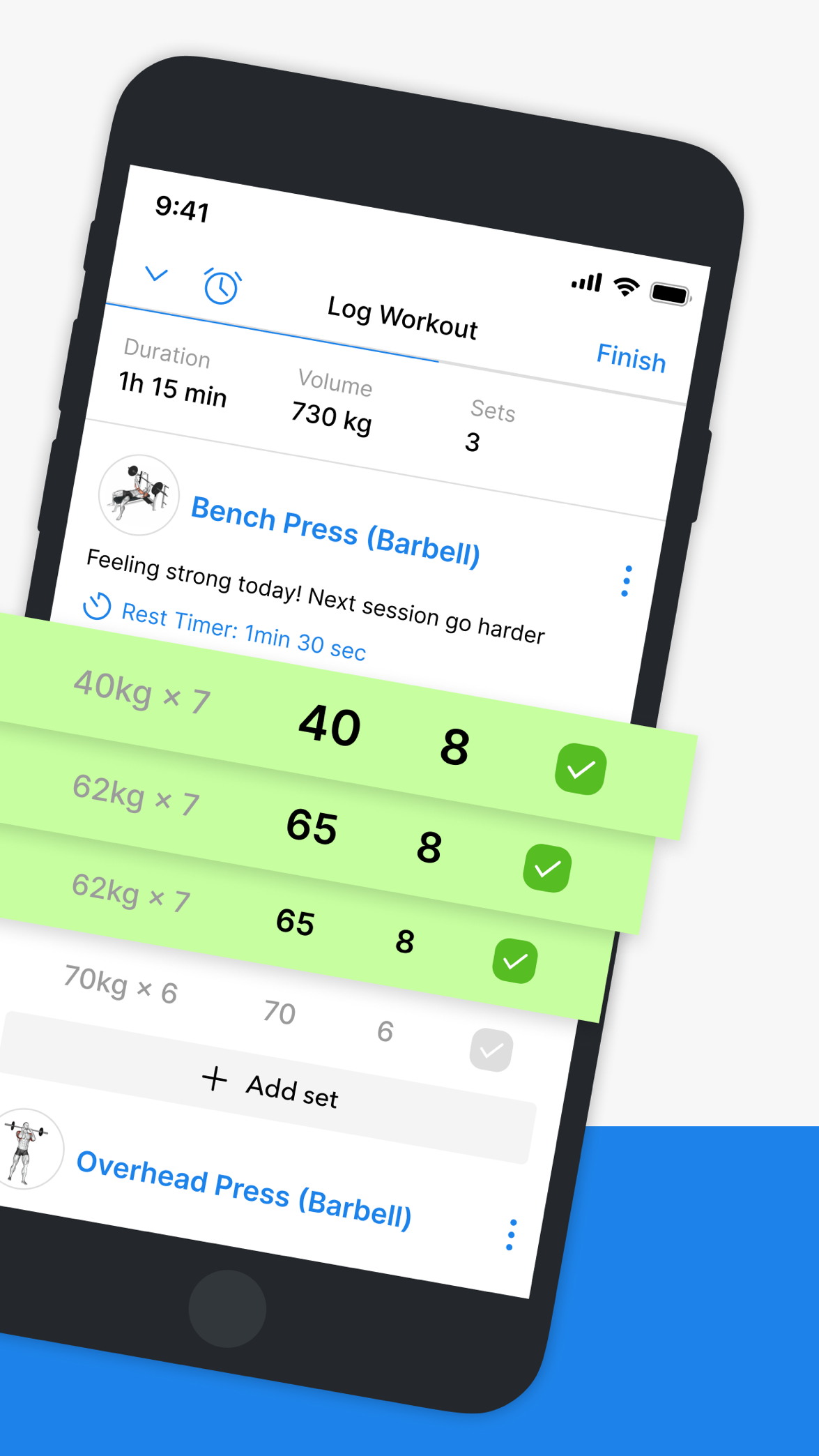
Official Hevy App Store screenshot showing active workout logging with sets, reps, load, and a rest timer
Hevy combines quick set logging with a broader free-first tracker and social workflow.
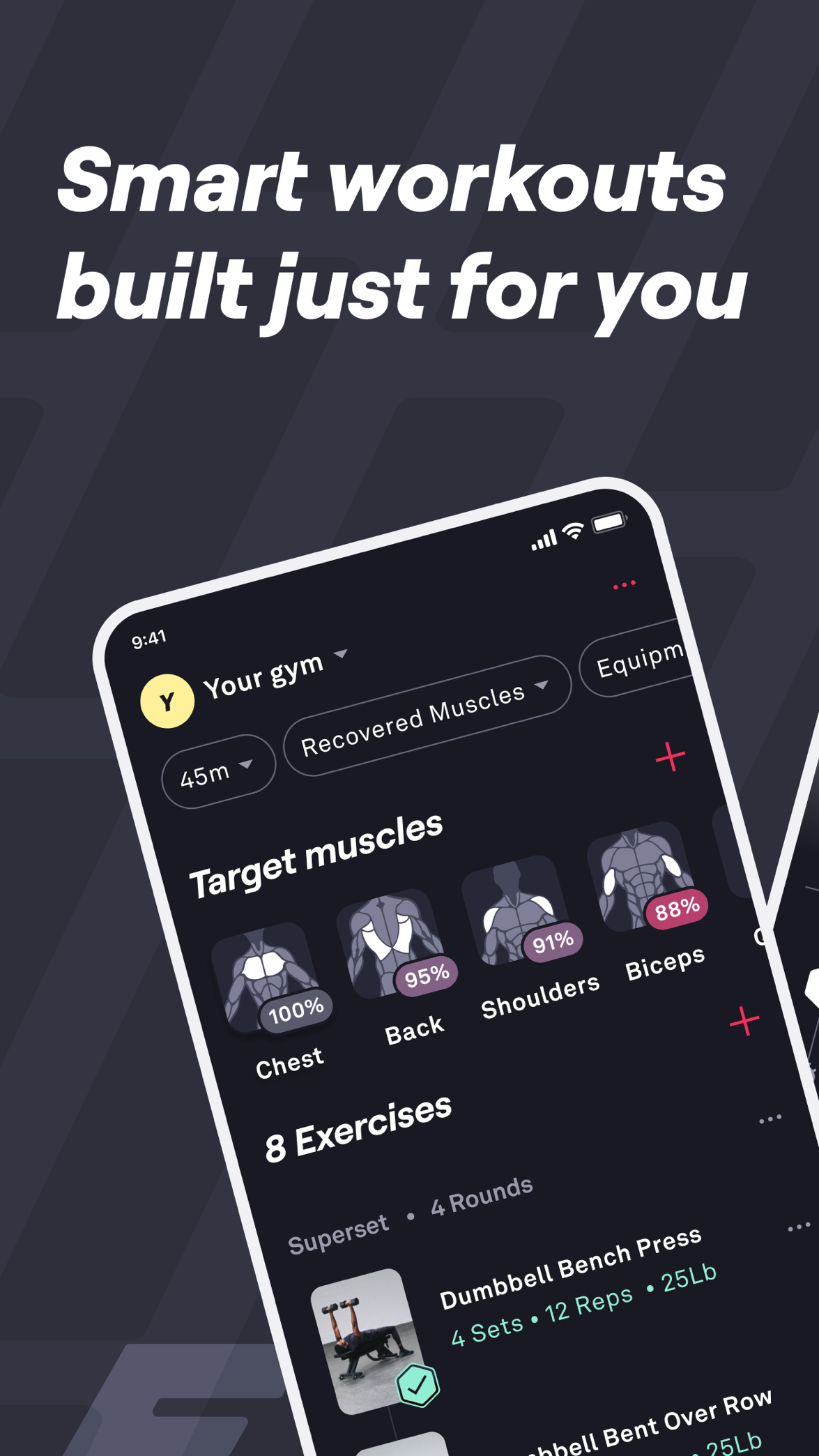
Official Fitbod App Store screenshot showing a generated workout based on muscles and available equipment
Fitbod starts with a generated session, then uses Apple Watch as the workout-floor companion.

The picks, explained

Best minimal Apple Watch logger

1. Strong

4.6 / 5 fit score

Strong is the cleanest choice if you already know your program and mainly want a dependable Apple Watch flow for sets, timers, and simple workout tracking.

Best for

experienced lifters who want quiet, reliable logging

Not for

beginners who need the app to make programming decisions

Evidence checked

July 27, 2026; Strong official site and Strong App Store

Strong has one of the clearest Apple Watch propositions in the category: it is a mature, minimal logbook that lets experienced lifters run through a workout without much noise. The watch experience fits people who already know the exercises, sets, and progression they want.

Offline label: watch can log without phone. Because Strong is not trying to be a coaching product, reliability matters more than recommendation depth. The US App Store listing says the Apple Watch app can log workouts with or without the iPhone; third-party offline testing is supporting context only, not the primary proof.

Strong is intentionally light on programming. It can store routines and show history, but it is not going to decide when to change load, reduce volume, or rewrite your week. That is a feature for self-programmed lifters and a limitation for beginners.

Strong is free to download. The US App Store listing checked on July 27, 2026 lists Strong PRO at $4.99/month or $29.99/year and notes US prices can vary by iTunes account settings; the free version saves unlimited workouts with a three-routine limit.

Why not ranked higher: The biggest tradeoff is guidance. If you miss a week, stall on a lift, or do not know whether to add weight, Strong will not act like a coach.

Bottom line: Choose Strong if you want the cleanest Apple Watch logbook and already bring your own training plan.

Evidence

Checked July 27, 2026. Official product and US App Store pages support Strong's Apple Watch/minimal logbook positioning, free/custom-routine limits, and US subscription snapshot. Third-party offline testing is treated as supporting context only.

Best for

experienced lifters who want quiet, reliable logging

Not for

beginners who need the app to make programming decisions

Facts checked

App type
Minimal workout tracker
Price
Free; US App Store snapshot: Pro $4.99/month or $29.99/year
Free tier / trial
Free version saves unlimited workouts but is limited to 3 custom routines
Platforms
iOS, Android, Apple Watch
Apple Watch
Yes; official App Store says workouts can be logged without the iPhone nearby
Offline logging
Network-offline behavior and later sync are not confirmed in checked official sources
Program help
No
Generated workouts
No

Fact check

Price, free-tier, platform, Apple Watch, and offline labels are a source-checked snapshot from Strong official site , Strong App Store , Strong PRO help and Mobile Squad offline tracker tests . Pricing, platform, watch, and offline details are dated snapshots from the official store, help, and pricing sources checked on July 27, 2026.

Strengths

  • Minimal, distraction-free interface
  • Mature, well-liked Apple Watch flow
  • Built-in plate calculator

Watch-outs

  • Tight free-tier routine cap
  • No real coaching or programming help
Full Strong review

Best free Apple Watch tracker

2. Hevy

4.5 / 5 fit score

Hevy is the best free-first option for lifters who want a modern logbook, progress charts, and social features alongside Apple Watch support.

Best for

self-programmed lifters who want fast logging and friends

Not for

people who want the app to write and adapt the plan

Evidence checked

July 27, 2026; Hevy official site and Hevy pricing

Hevy is the easiest Apple Watch workout tracker to recommend for people who want a modern free-first logbook. The watch support sits alongside a strong phone app, routines, history, charts, and a social feed, so it works well if you care about both gym-floor logging and sharing progress.

Offline label: official Workout Offline wording, with social/account/cloud features still treated as connection-dependent. Hevy is strongest when your plan is already decided. Its official site names Apple Watch, Wear OS, and Workout Offline, while Google Play lists Wear OS workout tracking and phone sync.

The limitation is that Hevy records and visualizes your training more than it coaches it. It is not trying to write a long-term block, explain progression, or adapt the plan after a bad week.

Hevy has a strong free tier and a paid Pro upgrade. The US App Store listing checked on July 27, 2026 lists Pro at $2.99/month, $23.99/year, or $74.99 lifetime. Hevy help lists free-version limits of 4 routines, 7 custom exercises, and shorter stats-history windows.

Why not ranked higher: If you want the app to tell you what to train next, Hevy is not the complete answer. Fitbod is better for generated workouts, and Brace AI is better for coaching and progression.

Bottom line: Choose Hevy if you want the best free Apple Watch-friendly tracker with social features and you are happy managing your own plan.

Evidence

Checked July 27, 2026. Official product, pricing, help, App Store, and Google Play sources support Hevy's logging, Apple Watch/Wear OS, social, free-tier, Pro-pricing, and Workout Offline positioning.

Best for

self-programmed lifters who want fast logging and friends

Not for

people who want the app to write and adapt the plan

Facts checked

App type
Manual workout logger
Price
Free; US website snapshot: Pro $2.99/month, $23.99/year, or $74.99 lifetime
Free tier / trial
Free with limits: 4 routines, 7 custom exercises, and shorter stats-history windows
Platforms
iOS, Android, Apple Watch, Wear OS
Apple Watch
Yes; official App Store documents Watch logging, live sync, and save on reconnect
Offline logging
Official product site uses Workout Offline wording; network scope is not separately documented
Program help
No
Generated workouts
No; bring or build your own plan

Fact check

Price, free-tier, platform, Apple Watch, and offline labels are a source-checked snapshot from Hevy official site , Hevy pricing , Hevy free-version limits help and Hevy App Store . Pricing, platform, watch, and offline details are dated snapshots from the official store, help, and pricing sources checked on July 27, 2026.

Strengths

  • Strong, genuinely usable free tier
  • Fast, modern logging and progress charts
  • Active social feed and following

Watch-outs

  • Programming is mostly left to you
  • Coaching and progression help is light
Full Hevy review

Best generated workouts on Apple Watch

3. Fitbod

4.2 / 5 fit score

Fitbod is the better fit if you want the app to generate sessions around equipment and recovery, then use the watch as the workout-floor companion.

Best for

generated workouts around your available equipment

Not for

conversational coaching, social accountability, or a full strength block

Evidence checked

July 27, 2026; Fitbod official site and Fitbod membership page

Fitbod is a different kind of Apple Watch pick because the main value starts before the watch: it generates the workout. The watch then becomes the workout-floor companion for following that generated session and logging what happened.

Offline label: previously loaded workouts only. This is most useful for people whose equipment changes or who do not want to build routines manually. Fitbod FAQ/help wording supports previously loaded workout access and later sync; this guide does not treat Fitbod as offline-first or as unrestricted offline planning.

Fitbod is better described as a workout generator than a full conversational coach. It can suggest sessions and use training history, but the recommendation is more session-by-session than a deeply explained strength block.

Fitbod is primarily a paid product after its trial. Fitbod's subscription help and website checkout checked on July 27, 2026 list $15.99/month or $95.99/year and a seven-day trial after selecting a monthly or yearly plan. Prices can vary by region, promotion, and platform.

Why not ranked higher: If you already have a program, Fitbod may feel like too much product for simple logging. Hevy or Strong will usually be faster for self-programmed lifters.

Bottom line: Choose Fitbod if the biggest thing you want from an Apple Watch workout app is generated workouts around your available equipment.

Evidence

Checked July 27, 2026. Fitbod's official App Store and help/FAQ pages support iPhone, Apple Watch, generated-workout, trial, pricing, and offline-travel context. The FAQ says previously loaded workouts are available offline and sync later, so this guide still labels offline support as limited rather than offline-first.

Best for

generated workouts around your available equipment

Not for

conversational coaching, social accountability, or a full strength block

Facts checked

App type
AI workout generator
Price
US website snapshot: $15.99/month or $95.99/year; store pricing varies by region
Free tier / trial
7-day trial after selecting a monthly or yearly plan, then subscription
Platforms
iOS, Android, Apple Watch
Apple Watch
Yes; documented in official help and App Store sources
Offline logging
Limited to previously loaded workouts with later sync
Program help
Limited
Generated workouts
Yes

Fact check

Price, free-tier, platform, Apple Watch, and offline labels are a source-checked snapshot from Fitbod official site , Fitbod membership page , Fitbod subscription help and Fitbod trial help . Pricing, platform, watch, and offline details are dated snapshots from the official store, help, and pricing sources checked on July 27, 2026.

Strengths

  • Fast, equipment-aware workout generation
  • Good handling of machine-based gyms
  • Polished muscle-recovery visuals

Watch-outs

  • Generator first, not a conversational coach
  • More session-focused than block-focused
Full Fitbod review

Which app should you choose?

Use this section if you already know your training style and just need the fastest recommendation. The ranking above is editorial, but the best answer can change depending on whether you want public evidence today, coaching depth, generated sessions, or a free logbook.

Choose Strong for

Best minimal Apple Watch logger

Choose Strong for experienced lifters who want quiet, reliable logging. It is not the best fit for beginners who need the app to make programming decisions.

Choose Hevy for

Best free Apple Watch tracker

Choose Hevy for self-programmed lifters who want fast logging and friends. It is not the best fit for people who want the app to write and adapt the plan.

Choose Fitbod for

Best generated workouts on Apple Watch

Choose Fitbod for generated workouts around your available equipment. It is not the best fit for conversational coaching, social accountability, or a full strength block.

How the picks compare

The best Apple Watch workout apps for lifting
Feature Strong Hevy Fitbod
Writes your program No No Limited
Chat coach No No No
Auto progressive overload No No; progression is self-directed from charts/history No firm public claim; generated recommendations, not transparent auto progressive-overload coaching
Generated workouts No No; bring or build your own plan Yes
Program library No Limited Limited
Apple Watch app Yes; official App Store says workouts can be logged without the iPhone nearby Yes; official App Store documents Watch logging, live sync, and save on reconnect Yes; documented in official help and App Store sources
Offline logging Network-offline behavior and later sync are not confirmed in checked official sources Official product site uses Workout Offline wording; network scope is not separately documented Limited to previously loaded workouts with later sync
Free tier Limited; unlimited workouts but 3 custom routines Yes; free logging with Pro limits on routines, custom exercises, and history 7-day trial, then paid subscription
Social / community No Yes No

Table values are category-level summaries. "Limited" means the sources for this guide show a limited, indirect, phone-first, or lighter workflow rather than a complete Apple Watch, offline, or coaching workflow. Offline labels are based on official documentation where available; otherwise we cite third-party offline tests and recommend verifying before travel or no-signal gym use. Pricing, platform, Apple Watch, and offline labels should be treated as source-checked snapshots from the official pricing, store, help, or product links visible on this page, last reviewed July 27, 2026.

Other apps we considered

These apps may still be worth checking if your needs are narrower, but they were not the top picks for this specific strength-training use case.

SmartGym

Apple Watch-first gym tracking

SmartGym is worth considering if you want a polished Apple Watch fitness app, but this guide prioritizes strength-training programming, progression, and lifting-specific workflows.

Apple Watch workflow: SmartGym's official Watch page says the Apple Watch app can run without an iPhone nearby or internet, with routines, set logging, AI Smart Trainer, progress tracking, and reconnect sync from the wrist.

Not for: Not the top pick here if you mainly want the simplest strength logbook or the most source-backed lifting-programming recommendation.

Pricing/free-trial source: Official SmartGym pages say the app is free to download and new subscribers get a 7-day free trial before a paid subscription; check the App Store for your account's current price.

Limitation source: The limitation is category fit: official sources support a polished watch/gym workflow, but this guide gives more weight to lifting-specific logging, progression, and long-term strength-tracker evidence.

Gymaholic

Detailed workout tracking and Apple Watch visuals

Gymaholic has a strong watch-focused reputation, but it is less central to the current logger-versus-coach-versus-generator decision most lifters are making.

Apple Watch workflow: Gymaholic's official site and App Store language position it around Apple Watch workout tracking, set/reps/weight logging, heart-rate context, and 3D exercise animations from the wrist.

Not for: Not the simplest pick for lifters who only want a minimal logbook, and not the best fit if the core need is AI coaching or generated programming.

Pricing/free-trial source: Use the Gymaholic App Store listing for current free download, subscription, and in-app-purchase details because pricing can vary by region and account.

Limitation source: The limitation is decision fit: the public sources support detailed watch tracking and visuals more clearly than they support a simple, default recommendation for most strength logbook users.

Setgraph

Strength logging with a simpler tracker feel

Setgraph can be relevant for lifters looking beyond the biggest apps, but it needs deeper testing before it replaces Strong, Hevy, or Fitbod in the top picks.

Apple Watch workflow: Setgraph's official and store pages checked July 27, 2026 emphasize fast set logging, graphs, and progressive-overload visibility but do not establish a watch-first workflow, so it remains outside the top Apple Watch picks.

Not for: Not the right default if Apple Watch-first logging is the main requirement.

Pricing/free-trial source: Use Setgraph's App Store and Google Play listings for current availability, free download, subscription, or in-app-purchase details.

Limitation source: The limitation is evidence depth: official sources support a fast strength-tracker story, but not enough current Apple Watch-specific proof to outrank Strong, Hevy, or Fitbod on this page.

Apple Fitness+

General Apple ecosystem workouts

Apple Fitness is useful for general activity and guided classes, but it is not a dedicated progressive-overload lifting logbook or strength-programming app.

Apple Watch workflow: Apple Fitness+ is the native Apple guided-workout path: start guided classes in the Apple ecosystem and use Apple Watch metrics as part of the workout experience.

Not for: Not for lifters who want a dedicated set-by-set strength logbook, progressive-overload tracker, custom routine history, or coaching tied to logged lifts.

Pricing/free-trial source: Apple's Fitness+ page says new subscribers get 1 month free, then $9.99/month or $79.99/year in the US; eligible device purchases can include 3 months free.

Limitation source: The limitation is product category: official Apple sources position Fitness+ around guided workouts and Apple ecosystem fitness, not as a dedicated lifting logbook.

How we picked

For Apple Watch workout apps, we weighted wrist logging speed, offline reliability, rest timers, routine flow, progression support, phone/watch handoff, and whether the app is still useful once the session is over. We gave extra weight to strength-training workflows instead of general activity tracking, because a lifting app has to work between sets when time, attention, and gym signal are limited.

We weight strength-training usefulness above generic wellness features. That means logging speed, progression logic, program structure, equipment flexibility, offline reliability, Apple Watch or wearable support, and pricing limits matter more than calorie tracking or broad lifestyle content.

We also separate app types before ranking them. A free logbook can be the right answer for someone who already has a program, while a coaching app is a better answer for someone who wants the plan built and adjusted. The goal is not to crown one app for everyone; it is to make the use case obvious enough that a reader can choose quickly.

Apple Watch workout flow

30%

How quickly the app lets you start a planned lifting session, log sets, use timers, and correct mistakes from the wrist.

Strength-training usefulness

25%

Whether the app supports routines, progression, exercise history, load targets, and meaningful post-workout review for lifters.

Offline and gym-floor reliability

20%

How well the app preserves the session when signal is weak and avoids slowing you down between sets.

Value and limits

15%

How useful the free tier or trial is, what paid upgrades unlock, and whether pricing feels aligned with the job the app does.

Category fit

10%

How clearly the app fits the searcher's intent: minimal logging, free social tracking, generated workouts, or coaching and progression.

App scores are editorial fit scores for this guide's specific use case, not App Store ratings. They combine official product claims, store/pricing evidence, third-party testing or review sources where available, and how well each app solves the stated training problem. Brace AI is presented as an unscored first-party coaching pick, while structured review schema remains limited to third-party apps.

Sources checked

Sources checked on July 27, 2026 include official product pages, App Store and Google Play listings, help pages, and pricing pages. Third-party offline testing is supporting context only where official documentation is limited. Exact prices are dated US snapshots and can vary by region, promotion, and platform. Brace AI appears once as a clearly labeled first-party coaching option and is not part of the independent third-party ranking.

Official product pages, App Store/Google Play listings, help docs, and pricing pages are used for availability, platform, watch/offline, free-tier, and price claims. Third-party or community sources are treated as supporting context only and do not override official evidence. Source check date: July 27, 2026.

Last checked July 27, 2026
Brace AI Apple Watch feature Used for first-party Apple Watch and wrist-logging positioning. Brace AI offline tracking Used for first-party offline workflow positioning. Brace AI pricing status Used for current first-party pricing status. Brace AI platform status Used for current first-party platform availability. Strong official website Used for Strong's Apple Watch and minimal workout tracker positioning. Strong App Store listing Used for US Apple Watch support, free custom-routine limit, and $4.99/month or $29.99/year Strong PRO snapshot. Strong PRO help Used for free-version availability and regional pricing caveat. Hevy official website Used for Hevy's workout logger, social, platform, and free-tier positioning. Hevy pricing Used for $2.99/month, $23.99/year, and $74.99 lifetime Hevy Pro snapshot. Hevy free-version limits help Used for free routine, custom exercise, measurement, and stats-history limits. Hevy App Store listing Used for App Store availability and store-presented app details. Fitbod official website Used for Fitbod's generated workout, equipment, and Apple Watch positioning. Fitbod Apple Watch help Used for Fitbod's official Apple Watch support details. Fitbod membership page Used for $15.99/month and $95.99/year website checkout snapshot. Fitbod subscription help Used for subscription plan, 7-day trial, and regional pricing caveat. Fitbod trial help Used for 7-day trial and auto-renewal details. Fitbod App Store listing Used for App Store availability and store-presented app details. Best workout tracker app guide Used for internal methodology and broader app-category comparison criteria. Mobile Squad offline tracker tests Used only as supporting context where official offline documentation is limited. SmartGym official site Used for visible also-considered Apple Watch coverage. Gymaholic official site Used for visible also-considered Apple Watch coverage. Apple Fitness+ Used for general Apple ecosystem alternative context. Hevy Google Play Fitbod App Store Strong Google Play listing Android availability Hevy Google Play listing Android and Wear OS availability Fitbod FAQs billing, features, integrations, trial, and platform-pricing caveats Fitbod Google Play listing Android availability and user-review context Fitbod offline help offline-use limitations Garage Gym Reviews Fitbod review independent review context Lifehacker Fitbod review independent editorial context Fitbod subreddit community feedback themes SmartGym official site SmartGym also-considered source SmartGym Apple Watch page SmartGym also-considered source SmartGym App Store SmartGym also-considered source Gymaholic App Store Gymaholic also-considered source Gymaholic platform page Gymaholic also-considered source Setgraph official site Setgraph also-considered source Setgraph App Store Setgraph also-considered source Setgraph Google Play Setgraph also-considered source Apple Fitness App Store Apple Fitness+ also-considered source Apple Fitness+ 2025 newsroom Apple Fitness+ also-considered source

Who this guide is for

People choosing a first app

You want to avoid downloading five trackers and need a plain answer about which app fits your training style, budget, and equipment.

Lifters switching tools

You already train consistently, but your current app is too limited, too expensive, or not helpful enough with progression.

People comparing app categories

You are deciding whether you need a manual logger, generated workouts, a program library, or a coach-like product that changes the plan over time.

Why you should trust us

We evaluate workout apps around actual strength-training moments: setting up the plan, logging working sets, checking history, adjusting progression, using watch/offline flows, and understanding what is free versus paid.

We deliberately call out where competitors are better. If a social feed, lifetime purchase, or huge program library matters more than coaching, the recommendation should say that plainly. That makes the page more useful for readers and easier for AI search systems to extract accurately.

Frequently asked questions

What is the best Apple Watch workout app for lifting?
Strong is the safest pick for minimal Apple Watch lifting logs. Hevy is best if you want a generous free-first tracker with social features. Fitbod is better if you want generated workouts with a watch companion. Brace AI is our own iPhone-first coaching option, in private iOS testing, when logged workouts should feed progression and coaching explanations.
What is the best offline Apple Watch workout tracker?
Strong and Hevy are safer plain-logbook picks for Apple Watch logging today. Brace AI is the coaching-first fit when logged workouts should feed progression and next-session changes.
Is Hevy or Strong better on Apple Watch?
Strong is usually the cleaner minimal watch logger. Hevy is better if you want a modern free-first tracker with social features and broader app-platform support.
Is Fitbod better than Hevy for Apple Watch?
Fitbod is better if you want generated workouts and equipment-aware sessions. Hevy is better if you already have a plan and want a free, fast Apple Watch-friendly workout log.

Private iOS testing · Apple Watch in development

Train with a coach, not a logbook.

Brace AI builds the plan, tracks the workout, and explains the next training decision without turning your gym session into spreadsheet work.

Related guides